PickMD
Company

Markdown reader · .md / .markdown

Give your Markdown
a better read.

Notes, AI answers, technical docs.
Turn the words worth keeping into pages worth reading.

Available on the App Store and Google Play

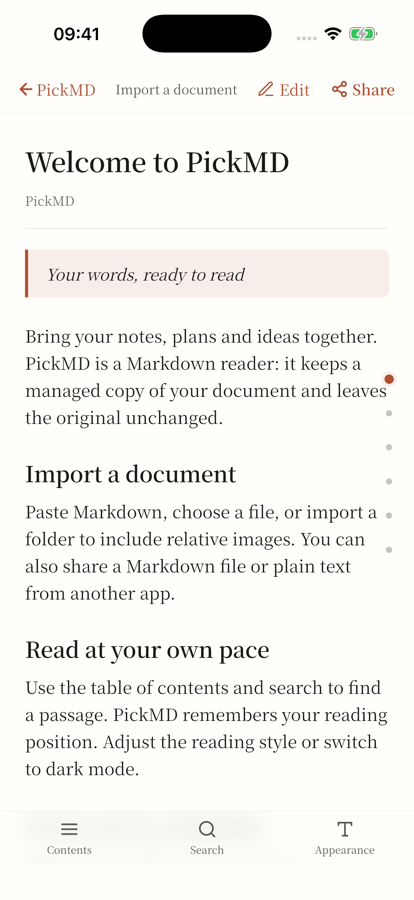
The real Markdown reading screen in PickMD for iPhone
Your words. Your reading rhythm.
Markdown filesMermaid diagramsMath formulasPDF & long imagesLocal documents

The freedom of plain text.
The pleasure of a good read.

Same Markdown. A different experience. Switch views to see plain text become clear headings, lists and tables.

my-next-good-idea.md

For your next good idea

Capture the thought. Take time to read.

From a conversation or a quick note to a document you’ll want to open again.

  • Keep the words that matter
  • Make a little time to read
ContentA better way to read
Project notesFind the point with the contents
AI conversationsSave as Markdown. Revisit anytime.
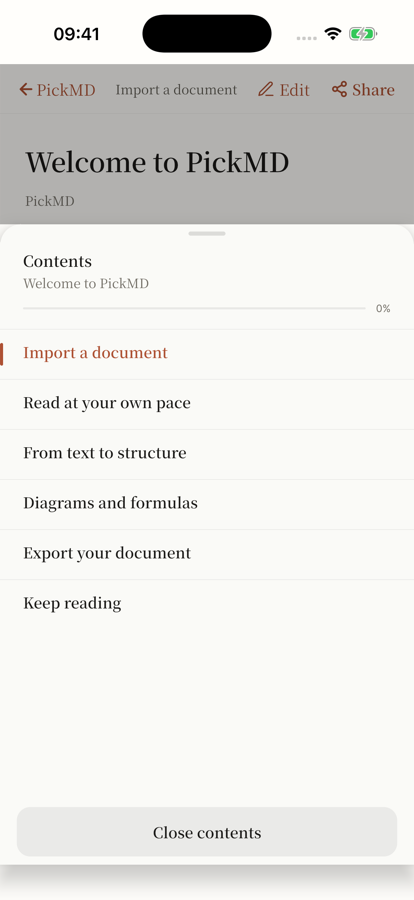
The chapter contents screen in PickMD

Pick up right
where you left off.

Jump to a chapter. Search for that one sentence. PickMD remembers your reading position, so the next time you open a document, your train of thought is still there.

  • Reading styles and dark mode
  • Contents and full-text search
  • Saved reading position

Big ideas.
Small screen. All there.

Code, tables, Mermaid diagrams and math formulas keep their meaning. Bring the whole thought along, wherever you read.

Math formulas
f(x) = 11 + e−x
Mermaid diagrams
An ideaWrite MarkdownOpen PickMDRead it. Share it.
Syntax-highlighted code
const idea = {
  format: markdown,
  readyToRead: true
};

A good read.
Ready to go places.

Turn a document into a PDF or a long image. Preview it, save it, share it. Give your notes a life beyond the app.

PDFReady to save, print or send

PNGOne image. One continuous read.

Your documents.
Still in your hands.

Import .md and .markdown files, paste text, or bring in a folder with its local images. PickMD keeps a local, managed copy and leaves your original file untouched.

Local documents do not need a continuous connection. Remote images and external links use the internet.

A familiar language.
A world of reading.

The interface follows your phone’s language, so you can feel at home from the first page. Meet PickMD on iPhone and Android.

iOS supports the 13 interface languages below. The current Google Play version supports Simplified and Traditional Chinese, English, Spanish, Japanese and Korean. Documents stay in their original language; they are not automatically translated.

Markdown reader

PickMD is a Markdown reader and MD file viewer for your phone. Import .md or .markdown files, paste text, or import a folder with local images to read notes, AI responses and technical documents.

Reading Markdown files: common questions

How do I open an MD file on my phone?

Import .md and .markdown files, paste text, or bring in a folder with its local images. PickMD keeps a local, managed copy and leaves your original file untouched.

Can I read Markdown offline?

Local documents do not need a continuous connection. Remote images and external links use the internet.

How do I export Markdown to PDF or a long image?

Turn a document into a PDF or a long image. Preview it, save it, share it. Give your notes a life beyond the app.

Which interface languages are supported? Are documents translated?

iOS supports the 13 interface languages below. The current Google Play version supports Simplified and Traditional Chinese, English, Spanish, Japanese and Korean. Documents stay in their original language; they are not automatically translated.

PickMD

Your next Markdown file
deserves PickMD.

Bring your words. Find your reading rhythm.

Availability depends on your local app storefront.

Help make PickMD better.

Found a problem or have an idea? We’d love to hear it.

5–3,000 characters